May 5, 2011 | Blast
After a long time, we’re happy to announce a fairly large update to Blast.
Version 1.7.0 adds multiple files selection, QuickLook previews (10.6+), Evernote integration (send files to Evernote), more tracked files and bug fixes. Below are the full release notes.
The version is already available on our site (check for updates from within Blast menu or download here). We’ll soon submit it to the Mac App Store as well but it usually takes about a week for new versions to appear there. So if you’re a Mac App Store customer, you might need to wait longer.
- Multiple files selection – you can now select multiple files by clicking on them with Shift or with Cmd keys. You can then drag them all or right-click to get a menu relevant to all these files.
- Evernote integration – you can now send files to Evernote, even to specific notebooks. Evernote for Mac is required for this.
- Quicklook previews – Pressing space while on a file or files in the recent files list will now show these files in a Quicklook panel a-la Finder. The shortcut to reveal the selected files in Finder is now Cmd-Return, instead of Space, like in previous versions.
- Separated lists of files in each filter. Now each filtered view has its own list of files, so if you add a lot of images, for example, they won’t remove your documents or applications. The “All Files” view will show the combined list of all these filters and may now be much longer.
- A new setting in Preferences allows selecting the number of files you want to have in your recent list, per filter. Increased the maximum number to 500 files per filter. So the “All files” view can now reach 3000 files.
- You can sign to Blast newsletter right from within the application (in the menu).
- Documents modified by other users on your Mac, which are also logged in will now not show in Blast.
- Fixed a bug where folders and applications wouldn’t be tracked by Blast if “Opened Files” setting was checked off.
- Fixed automatic checking of new versions, which was broken in 1.6.5 for most users.
- Added debugging log (accessible with Cmd-L). May be helpful if you want to know why something’s invisible in Blast or need to give more information to our support.
Nov 11, 2010 | Blast
This release focuses on improving Blast in several areas, most notably performance-wise.
Several users complained that Blast would sometimes use up to 100% of CPU during large file operations such as copying folders with large amount of files. I’m sure other users experienced this as well but didn’t notice or did not report. This update should improve the performance of adding files to Blast tenfolds or even more.
A bug was fixed where no files were added to Blast if both “Show folders” and “Show opened” settings in Preferences were unchecked.
A tooltip that appeared when hovering over files in the list now displays full path name instead of the modification time. This is more useful in cases that the path or file name are long.
Lastly, we’ve added a “Send Feedback” form. You can now send feature requests, bugs and support issues right from within Blast. Accessible from the menu.
Everyone are encouraged to update. You can autoupdate from Blast’s menu.
Sep 5, 2010 | Blast, Cashculator
Today we had two small releases:
Cashculator 1.2.4 release notes:
- NEW: Added a “Cancel” button to password enable/disable dialog.
- UPDATE:Add more information for a common support case to help resolve the issue
- UPDATE:Updated Japanese translation
Download Cashculator from http://www.apparentsoft.com/cashculator/download or auto-update.
Blast 1.6.3 release notes:
- NEW: Hide applications’ .app extension unless overridden in Finder preferences.
- CHANGED: Trial notice dialog now has a button to enter licensing dialog to enter license information.
- Some more changes to help with common support issues.
Download Blast from http://www.apparentsoft.com/blast/download or auto-update.
Everyone is encouraged to update, although not all will see the immediate benefits.
Aug 16, 2010 | Blast
After we update Blast’s menu icon in version 1.6 many people wrote back and asked to return the old one. Yet, we replaced the old one since it was also consistently criticized as being too different. So, we’ve taken a 2-part solution to this:
- We made the new detonator icon, introduced in 1.6, less ugly. I added some rounded corners and made letter B a bit wider and softer. The whole icon looks much softer now.
- I brought the old icon back as well, as an option. You can now select which icon you want to see on your menu bar in the preferences:
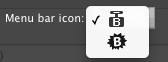
Blast 1.6.2 also fixes the following issues:
- Don’t hide main window when resizing it.
- Hide main window when selecting “Show in Finder” in context menu.
- Changed sidebar font to system font which makes the text more readable.
Jul 13, 2010 | Blast
Blast 1.6 answers many of the requests brought forward by our users. Your suggestions make Blast better each time. Blast now has a new menu icon:

Here are the release notes for Blast 1.6:
- NEW: Blast window can now be resized vertically. A menu item can also reset window height to default.
- NEW: Added titles for sidebar items. Also increased its width.
- NEW: Made files inside packages not visible.
- NEW: Split show Folders and show Applications options.
- NEW: Can now rename files (from right-click menu)
- NEW: Modified menu icon to be more in line with the theme and highlighted correctly.
- NEW: Added “Return to top” option. If you prefer, you can ask Blast to always go to the most recent file when the window opens, instead of keeping last position.
- NEW: Made highlighting of selected item lighter.
- NEW: Hide folder and application kinds buttons if user selected not to track them
- NEW: Show about window attached to the icon, on first launch, to help new users find Blast’s menu bar icon.
- NEW: Added help image to default sidebar. This is only available for new users. Help image can always be accessible from the menu.
- FIX: Handle close to screen edge situation, which made Blast’s window go off screen.
Jun 17, 2010 | Announcements, Blast
Just three days after the release of Blast 1.4 we bring you Blast 1.5. It brings some of the most requested features and fixes an important bug (Sidebar items were not remembered between launches). Here are the full release notes:
NEW: Blast now handles non-system drives as well
NEW: Added tracking for Applications
FIX: Sidebar items are now saved between launches
NEW: Deleted files are now removed from list automatically
NEW: Added “Open With” action
NEW: Added “Copy path to clipboard” action
NEW: Window now floats above other windows